ERP Software for Garment and Apparel Manufacturers
Style master with cost sheets and BOM per style, section-wise WIP from cutting to finishing, per-lot in-house or job work routing with ITC-04 compliant challans, and GST e-invoicing: one system deployed on dedicated infrastructure for your unit. 500+ manufacturers across India trust ERPDrive.
Where Excel and WhatsApp stop working in a garment unit
A 500 to 5,000 pcs/day unit in Tirupur, Ludhiana, Delhi NCR or Bengaluru typically runs on the same stack: cost sheets in Excel, production counts on WhatsApp, job work challans in a physical book, and Tally for billing. Each of these works alone. Together, they leave four expensive blind spots:
Style costing is guesswork
The cost sheet is typed into Excel once, at quotation time. Fabric consumption, trims, process rates and packing cost are estimates that are never reconciled against what the lot actually consumed. If the fabric ran heavier or the dyeing rate moved, the order silently ate the margin. You learn total profit at year end; style-wise profit, never.
Job work leakage
Fabric goes out to the dye house, printer or embroidery unit on a hand-written challan. What went, what came back, what was short, and what is still lying with the vendor after 90 days lives in one person's memory. Process loss is never questioned because nobody has the numbers to question it.
The WIP black hole between sections
Cutting says 5,000 panels were issued. Stitching says 4,780 were received. Finishing has a different number again. Between sections, material simply disappears from view. When a buyer asks for order status, the merchandiser walks the floor and phones each supervisor for a count.
ITC-04 quarter-end scramble
ITC-04 needs every job work challan and every receipt, matched. When those live in paper books across departments, the filing becomes a reconstruction exercise, and unreturned material past the statutory window becomes a GST exposure you discover late.
Bought in Kg, counted in Pcs
Fabric and yarn are purchased by weight; garments and many trims are counted in pieces. Excel cannot hold both units against one item, so purchase rates, stock counts and consumption never reconcile without a side calculation someone maintains by hand.
Decisions on stale numbers
By the time the day's production figures are typed into a sheet and forwarded, they are already old. Dispatch planning, fabric reordering and job work follow-ups all run a day behind the factory floor.
How ERPDrive Garment Edition runs your unit
The Garment Edition follows the way an apparel factory actually works: style first, then fabric, then a lot that moves section to section until it is packed and dispatched. Here is the flow we walk through in a demo:
- Style master with cost sheet and BOM per style
Every style is defined once: its bill of materials (fabric, trims, packing material), its cost sheet, and its pack ratios for cartons. The cost sheet stops being a one-time Excel artefact and becomes a living record attached to the style, so quoting the next repeat order starts from real data instead of memory.
- Grey fabric receipts, fabric and trim inventory
Grey fabric inward is recorded as a receipt the moment it arrives, and fabric and trim stock is tracked in the store. You know what fabric you hold, against which style or order it is earmarked, and what needs to be bought before the lot can be cut.
- Procurement with purchase-unit to stock-unit conversion
Buy in Kg, stock in Pcs. The conversion ratio sits on the item, and it is carried through the purchase chain: indent, purchase order, bill and goods receipt. Rates stay in the buying unit for the supplier; stock lands in the counting unit for the factory. No side spreadsheet.
- Production lots with per-process routing: in-house or job work, per lot
Each production lot follows the style's process routing, and every process on that routing can run in-house or go to a job worker, decided lot by lot. Your own dye house is full this week? Send lot 119 out and keep lot 118 in. Both paths are recorded against the same style, with nothing falling off the books.
- Job work challans and receipts with ITC-04 compliance
When material leaves for a job worker, a challan is generated; when processed goods return, a receipt closes the loop against that challan. Because outstanding challans are visible by vendor and by age, you chase material before it becomes a GST problem, and the data for ITC-04 filing is already structured.
- Section-wise WIP from cutting to finishing
Stock flows section to section: cutting issues to stitching, stitching to finishing, finishing to packing. Each section holds its own WIP stock, so the gap between what one section issued and the next received is visible the day it happens, not at the month-end physical count.
- Dispatch with GST e-invoicing and e-way bills
Packed goods are dispatched against the order, and the GST e-invoice and e-way bill are generated from the same dispatch document. No re-typing invoice data into a separate portal or a second software.
- Finance, accounting and WhatsApp notifications
Purchases, job work, sales and payments post into the built-in finance and accounting module, and WhatsApp notifications keep owners and customers informed without anyone having to type status messages by hand.
What is in the Garment Edition
These are built features of ERPDrive Garment Edition, not a customisation wishlist:
Style master with cost sheets
One record per style: cost sheet, BOM and pack ratios together.
BOM per style
Fabric, trims and packing material defined per style for planning and costing.
Grey fabric receipts
Grey fabric inward recorded at arrival, feeding fabric stock.
Fabric and trim inventory
Store-wise stock of fabric and trims with receipts and issues.
Purchase-unit to stock-unit conversion
Buy in Kg, stock in Pcs; conversion carried through indent to PO to bill to GRN.
Per-process in-house or job work routing
Every process on a lot's routing can run in-house or via a job worker, per lot.
Job work challans, receipts and ITC-04
Challan out, receipt in, outstanding visibility, ITC-04 compliant records.
Section-wise WIP tracking
Cutting to stitching to finishing to packing, each section holding its own stock.
Production lot tracking
Every lot traceable through its processes from cut to pack.
Dispatch with e-invoice and e-way bill
GST e-invoicing and e-way bills generated from dispatch documents.
Finance and accounting
Purchases, sales, job work and payments in one set of books.
WhatsApp notifications
Automatic updates to owners and customers on key events.
GST compliance, built into the flow
Compliance in a garment unit fails when documents are created after the fact. The Garment Edition creates them at the moment material moves:
Dedicated infrastructure, not a shared tenant
ERPDrive Garment Edition is deployed on dedicated infrastructure for your unit: your own instance and your own database, provisioned and managed by the ERPDrive team. Your production, costing and financial data does not share a database with anyone else. That is also why the Garment Edition is demo-first rather than self-serve signup: we set the system up around your styles, sections and job work vendors, then hand it over running.
Pricing
Frequently asked questions
Can a process run in-house for some lots and on job work for others?
Yes. In ERPDrive Garment Edition, routing is decided per process per lot. Dye lot 118 in-house, lot 119 to a job worker because your dye house is full: both paths are recorded against the same style and lot, with challans and receipts where material leaves the factory.
How does ERPDrive handle ITC-04 for job work?
Every job work movement is recorded as a challan when material goes out and a receipt when it comes back, linked to the lot. Because the challan and receipt data is captured at the time of the movement itself, the details your consultant needs for the periodic ITC-04 filing are in one place instead of being reconstructed from paper books at the deadline.
We buy fabric in Kg but count garments in Pieces. Is that supported?
Yes. Procurement supports purchase-unit to stock-unit conversion: you raise the indent and purchase order in the buying unit (Kg), and goods receipt converts to your stock unit (Pcs) using the item's conversion ratio. The conversion is carried through the purchase chain so rates and stock both stay correct.
What does dedicated infrastructure mean?
ERPDrive Garment Edition is deployed as its own instance with its own database for your unit. Your data does not sit in a shared multi-tenant pool. Setup, updates, and backups are managed by the ERPDrive team as part of the engagement.
Does it cover accounting and GST documents?
Yes. Finance and accounting are part of the system, and GST e-invoicing and e-way bills are generated from your sales and dispatch documents. Job work movements carry challans and receipts for ITC-04 compliance.
How do we get started? Is there a self-serve signup?
The Garment Edition is demo-first, not self-serve. Book a free demo, walk us through your styles and process flow, and we map the system to your unit. Because it runs on dedicated infrastructure, our team provisions and configures the instance for you.
The exact menus your production team will use
This is the real navigation from the ERPDrive Garment Edition: not a mockup. Every screen below ships with the product.
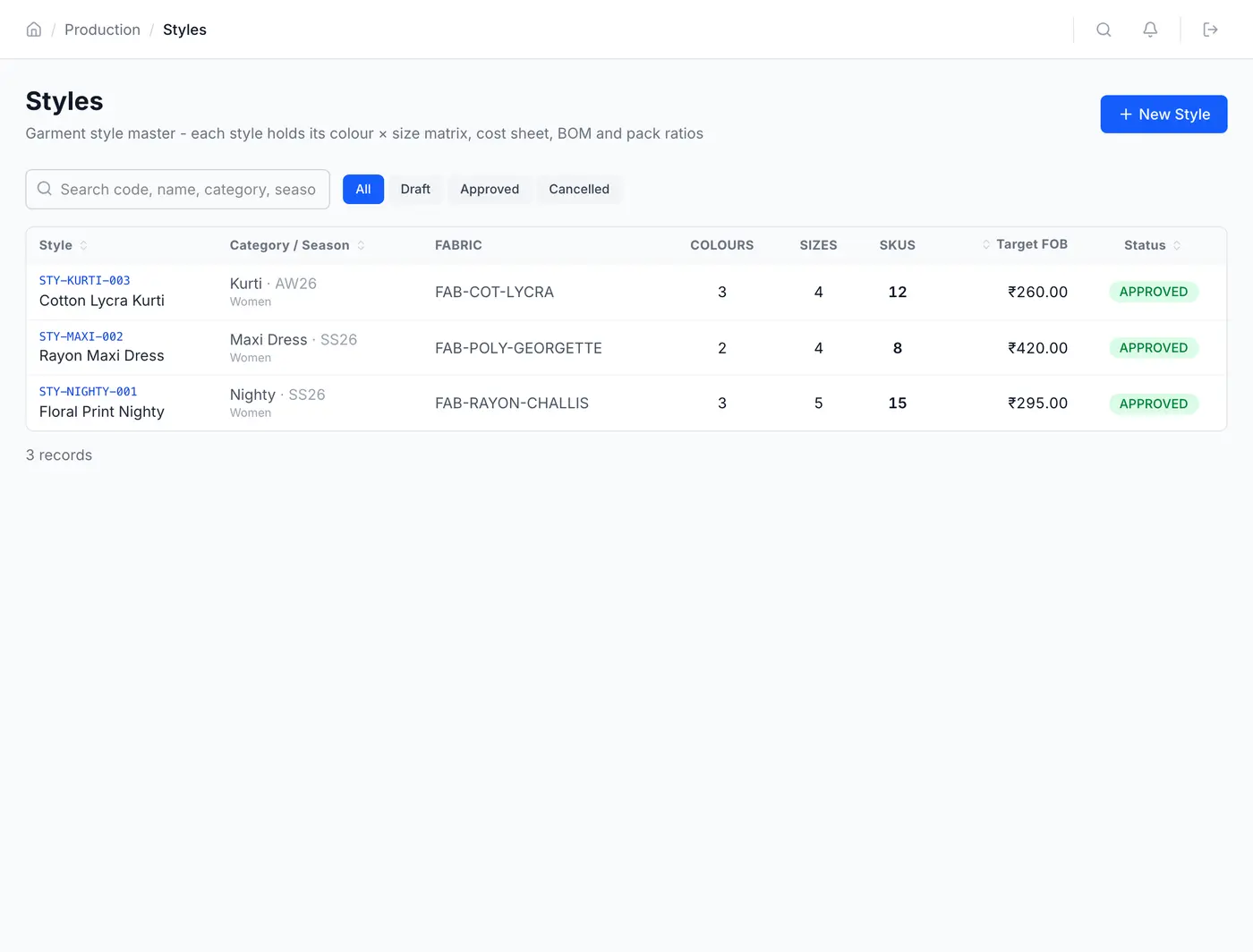
Actual navigation from the ERPDrive Garment Edition. Book a demo to click through it live.
See ERPDrive Garment Edition on your own styles
Free 30-minute personalized demo using your styles, sections and job work flow. Scheduled within 24 hours.
Prefer WhatsApp? Message us directly and we will call you back.